
Download Open Audio TTS – Text‑to‑Speech, AI Voice Generator, Free Online Tool
Overview
Open Audio TTS is a modern, web‑based Text‑to‑Speech (TTS) platform that taps into OpenAI’s powerful language models to turn any written passage into natural‑sounding audio. Designed for creators, educators, developers, and accessibility advocates, the service delivers a fast, secure, and completely free conversion experience without the need for bulky desktop installations. Whether you’re producing a podcast episode, generating an audiobook chapter, or adding spoken instructions to a mobile app, Open Audio TTS provides a reliable bridge between text and voice.
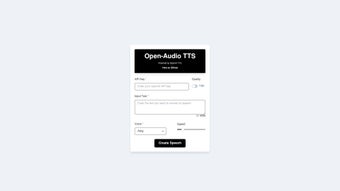
The interface is intentionally minimal: paste your text, choose one of the six distinct voice personas—Alloy, Echo, Fable, Onyx, Nova, or Shimmer—adjust the speech speed, and hit “Generate.” The result is an MP3 file ready for download or direct streaming. Because the engine runs in the cloud, the processing time stays low even for lengthy scripts, and the quality remains consistent across devices. Open Audio TTS also supports a broad set of input formats, from plain text to markdown, making it easy to integrate with existing content pipelines.
The only prerequisite is a free API key, which you can obtain from the project’s GitHub repository; this key unlocks the full suite of voices and ensures that usage stays within OpenAI’s generous free tier. Regular updates are posted on GitHub, giving users confidence that the tool will continue to evolve with the latest model improvements, security patches, and UI refinements. In short, Open Audio TTS offers a secure, flexible, and cost‑effective way to add high‑quality speech to any digital project.
Key Features & Capabilities
- Six AI‑crafted voice personas – Alloy (neutral), Echo (warm), Fable (storyteller), Onyx (deep), Nova (bright), and Shimmer (soft) cover a wide tonal range.
- Adjustable speech speed – Fine‑tune the rate from 0.5× (slow) to 2× (fast) to match pacing needs for tutorials, audiobooks, or announcements.
- Multi‑format text support – Accepts plain text, markdown, and basic HTML, allowing seamless import from blogs, scripts, or documentation.
- Instant MP3 download – Generates a high‑quality audio file (48 kHz, 128 kbps) that can be saved locally or streamed directly.
- Free API key integration – Leverages OpenAI’s free tier, eliminating subscription costs while maintaining professional‑grade voice synthesis.
- Cross‑platform web access – Runs in any modern browser on Windows, macOS, Linux, Android, or iOS without additional plugins.
- Secure data handling – Text is transmitted over HTTPS, and the API key never leaves the user’s browser session, ensuring privacy.
- Regular GitHub updates – Open‑source repository provides bug fixes, new voice releases, and community‑driven enhancements.
The feature set is deliberately curated for both beginners and power users. For instance, content creators can quickly generate a batch of podcast intros by pasting multiple paragraphs and selecting the “Nova” voice for a bright, energetic tone. Meanwhile, developers can embed the TTS endpoint into their own applications using the provided RESTful API, passing the API key and desired parameters programmatically.
The speech‑speed slider is particularly valuable for accessibility; educators can slow down complex material for learners with auditory processing challenges, while marketers can speed up promotional scripts for rapid social‑media posts. Because the service is hosted in the cloud, there’s no need to manage GPU resources or install heavyweight libraries on a local machine, which dramatically reduces the entry barrier for small teams and solo freelancers. All these capabilities combine to make Open Audio TTS a versatile tool that adapts to a wide spectrum of audio generation scenarios.
Installation, Usage & Compatibility
Getting started with Open Audio TTS is straightforward and requires only a web browser. Follow these steps to begin converting text to speech:
- Obtain a free API key – Visit the official GitHub page (https://github.com/open‑audio‑tts) and click the “Generate API Key” button. You’ll be prompted to sign in with your OpenAI account; once authenticated, copy the 32‑character key to your clipboard.
- Open the web app – Navigate to https://open‑audio‑tts.com in any modern browser (Chrome, Edge, Firefox, Safari, or Brave). The site automatically detects your operating system and loads the appropriate UI.
- Enter your key – Paste the API key into the secure input field at the top of the page. The key is stored locally in the browser session and never transmitted to third parties.
- Paste your text – In the large text box, insert the content you wish to vocalize. The tool supports up to 5,000 characters per request, which is sufficient for most blog excerpts or short chapters.
- Select a voice & adjust speed – Choose one of the six voice options and slide the speed control to your preferred rate. A live preview button lets you sample a short snippet before committing.
- Generate audio – Click “Generate.” Within seconds, the server returns an MP3 file that appears below the controls, with playback and download buttons.
- Download or embed – Save the file to your device, or copy the provided embed code to integrate the audio into a website, LMS, or mobile app.
Compatibility – Because Open Audio TTS is a pure web service, it works on any operating system that supports a modern browser, including Windows 10/11, macOS 12+, Linux distributions, Android 8+, and iOS 13+. No additional plugins, Java, or Flash components are required. The service also respects browser security policies, so it functions behind corporate firewalls and VPNs as long as outbound HTTPS traffic is allowed. For developers who prefer a command‑line workflow, the GitHub repository includes a lightweight Node.js wrapper that can be installed via npm install open‑audio‑tts, enabling script‑based batch processing on servers or CI pipelines. This flexibility ensures that whether you are a teacher using an iPad, a podcaster on a Windows desktop, or a SaaS platform integrating voice features, Open Audio TTS fits naturally into your workflow without friction.
Pros, Cons, FAQ & Conclusion
Pros
- Completely free for most use cases thanks to OpenAI’s generous free tier.
- High‑quality, lifelike voices that cover a broad emotional spectrum.
- No installation required; works directly in the browser.
- Adjustable speech speed provides fine‑grained control.
- Secure HTTPS transmission and local storage of API keys.
- Open‑source codebase encourages community contributions and transparency.
Cons
- Limited to six preset voice personas; custom voice creation is not yet supported.
- Maximum input length of 5,000 characters per request may require splitting longer documents.
- Reliance on an external API means occasional latency spikes during peak usage.
- Free tier may impose usage caps for high‑volume commercial projects.
Frequently Asked Questions
Do I need to pay for Open Audio TTS?
No. The service uses OpenAI’s free API tier, so you can generate speech without any direct cost, provided your usage stays within the free quota.
Can I use the generated audio commercially?
Yes, as long as you comply with OpenAI’s terms of service and any attribution requirements. For large‑scale commercial deployments, consider upgrading to a paid OpenAI plan.
Is there a limit on how many characters I can convert per day?
The free tier allows up to 200,000 characters per month. If you exceed this limit, you’ll need to switch to a paid plan or wait until the next billing cycle.
What browsers are supported?
All modern browsers that support HTTPS and JavaScript ES6, including Chrome, Edge, Firefox, Safari, and Brave on desktop and mobile platforms.
How secure is my API key?
Your API key is stored only in the browser session and never sent to third‑party servers. All communication with OpenAI’s API occurs over encrypted HTTPS.
Conclusion & Call to Action
Open Audio TTS stands out as a powerful, user‑friendly solution for anyone needing quick, high‑quality speech synthesis. Its blend of free access, six distinct voice styles, and granular speed control makes it ideal for content creators, educators, and developers alike. While the current voice library is limited to six personas and the free tier imposes reasonable usage caps, the overall value proposition is compelling, especially for small teams or solo creators who want to avoid costly licensing fees.
The open‑source nature of the project also means that future updates—such as additional voices or batch processing tools—are likely to arrive from the community. If you’ve been looking for a reliable way to turn articles, scripts, or lesson plans into engaging audio, give Open Audio TTS a try today. Simply grab your free API key from GitHub, paste your text, pick a voice, and download the resulting MP3 in seconds.
Experience the convenience of AI‑driven speech without the hassle of heavyweight software—your audience will thank you for the added accessibility and professionalism.



.png)



